I was just semi-complaining that I was still looking for a decent way to backup my +6k posts without having to use paid services or even just wordpress (which has an import from tumblr tool that asks for permission to access your blog and also make posts), when I decided to actually put some effort into my google search.
Results were positive: I have successfully backed up my blog*
*By which I mean: everything that I have ever posted. Not included: drafts, queue, likes, followers, following, comments, notes, chat.
I followed this method (word by word), and now have a 450 MB folder on my computer with the name of my blog on it containing:
1. Folder “Archive” (contains .html files listed by month) 2. Folder “Media” (contains gifs and images, mine has +1k files in it; might contain also audios but I have no way of confirming that because I’ve never reblogged an audio post from this blog) 3. Folder “Posts” (contains single .html files, each one a post; I have +4k files in it) 4. Folder “Theme” (contains only my avatar, but it might be a matter of if you have personalized themes or not) 5. .html file “Index” (by opening it it will give you the archive of your blog organized by month; clicking on a month will open up the archive for that month, and you’ll be able to read all the posts for that month as if you were on your blog**, except sans your theme graphic, with each page containing 50 posts)
**I can see gifs, links, embedded videos, tags, number of notes (but I can’t open up the notes, clearly), text is also correctly formatted.
So yeah, in case anyone wants a very quick way to back up their blog, it took me less than 10 minutes.
P.S. I didn’t have any issue, but to be on the safe side always check for spyware and virus threats before and after downloading anything.
“Many of the artists in the database were self-taught, barred from seeking formal training or studying anatomy on account of their gender. They could not hope to make a living from their talents when women were forbidden from issuing invoices.”
WHY DID NO ONE TELL ME ABOUT PRO WRITING AID BEFORE?! THIS THING IS FUCKING GLORIOUS. HOLY SHIT. LOOK AT THIS.
IT GIVES YOU A WHOLE DAMN REPORT ON YOUR WRITING AND WALKS YOU THROUGH HOW TO MAKE IT BETTER AND WHY IT IS SUGGESTING CHANGES. THIS IS JUST A TINY CHUNK OF THE HUGE REPORT IT GAVE ME ON THE FIRST CHAPTER OF ONE OF MY PROJECTS. I AM IN LOVE.
AND IT WORKS WITH SCRIVENER. AND IT IS AFFORDABLE.
WHY DID NO ONE TELL ME?!
Seriously, a couple hours with this and my first chapter is so much better. It helped me see problems I KNEW I had (passive voice, showing vs. telling, adverbs) but was having a hard time sussing out. It has made editing so much more fun and easy because now I know what the hell I’m doing and what to look for instead of stumbling around blind shouting “adverbs? adverbs?” like a town crier. I can already tell I’m getting better at seeing things without the program having to show me too.
Free Graphic Novels (DC, Marvel, Image, etc), Music, TV shows, and music on HOOPLA.
Free music that you can KEEP on FREEGAL
You are PAYING for all this with your tax money – USE THEM. Most likely systems will have all 3 or 2 out of 3, so if you aren’t sure call your local library’s reference/information desk and how you can get set-up or started.
make sure to read the poem at least 3 times over. skim once, and read twice. Skim and read once each if you don’t think you have enough time. Don’t let the length of it intimidate you.
annotate anything that will help you to answer the question. Answering the question, aside from literary devices on their own, is the most important.
be selective about the quotes and literary devices you find, and identify which ones you can write more about.
Tip for all my student readers: if you’re too lazy to use a bibliography creator like NoodleBib or RefWorks, let Google generate your bibliography entries for you. All you have to do is google the article/book title in Google Scholar, click “cite” at the bottom of the search result, and copy either the MLA, APA, or Chicago cite into your word document.
Signal boost because omg how did I not know this in college?
Since registration is starting soon I figure this is ample time to remind the six people who look at my Tumblr that citing your sources is really important in college and that this will be your best friend forever.
If you’re in high school and want to go to college? Learn to source! You’ll be way ahead of the curve and it’s 100% more important than knowing what the hell a predicate nominative is.
I use http://owl.english.purdue.edu/owl/ to figure out how to cite for my papers, and it’s been quite useful for the three years I’ve been at this!
Another good citation website is mendeley.com. You need to create an account, but it’s free. You can search through their database or they also have a browser extension which you just need to click once you’ve opened the article (or even just the abstract). From there it gets all the info you need to cite the paper, as well as downloading PDF files of it if they’re available. The citations will be in your library on the mendeley webpage and you can copy and paste them in the most common citation formats from there.
And you have those citations for as long as you have a membership at mendeley; they’re saved to your personal library. Incredibly helpful when you need to go back and find old papers for things.
Furthermore, if you’re like me and you need to use a weird citation style that isn’t as common as APA or MLA (I use the Geological Society of America formatting for most of my papers), you can download the free desktop app and it’ll properly cite your sources in even more citation styles.
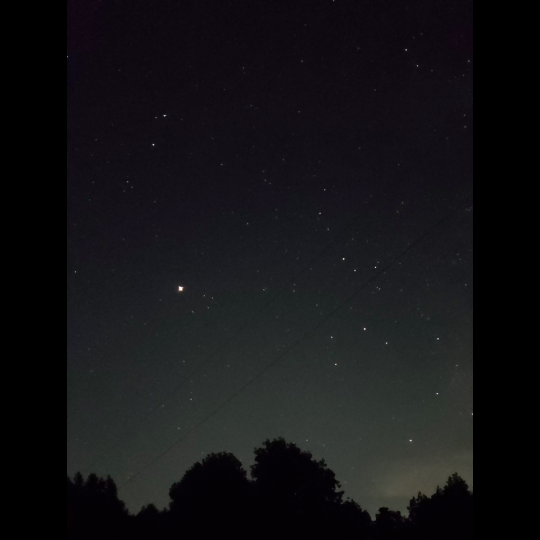
im very grateful for the lessons in photography i was taught in stop motion class because just now they made it possible to photograph the stars with my phone in spite of the camera usually not detecting the light of stars because theyre so dim,,,, enjoy these shiny motherfuckers
ok so if everythings normal, your phone camera should have a manual mode (sometimes called pro mode). in it, change the settings of the shutter lag to 20 seconds, then put the phone down on some stable, plane surface and press the photo button (usually when using your camera, the volume buttons can be used as photo button) and let the phone still for the whole 20 seconds.
(basically the problem with most cameras is that they dont have a very good light sensitivity in the dark, however that doesnt mean they cant detect it at all. the longer the shutter is open, the more light your camera takes in and the more burnt/light your pic will be, so in (literally) dark situations, make the shutter lag longer to get all that light you need! also i said 20 seconds but really you can make it shorter or longer depending on what kinda stuff you want for your stars)
Yes this!
Additionally, adjust your ISO to the highest number (mimics the film used for very low light and low speed images)
And set your shutter speed to the longest time possible (on my phone it’s 10 seconds).
Leave your focus settings on Auto, and if your phone camera has a timer option, turn that on (five seconds is generally enough).
Plan your shot first, then find a place to set your phone down so you can get the image you want. The less light pollution, the better; you’ll pick up FAR more stars in your picture.
Once you know what you want to shoot, tap your screen to “focus” it, then hit the button to take the picture, set your phone down, and back away from the “tripod”. Don’t touch your phone for a good 15 seconds, just to be sure.
You will not be disappointed in the results, let me assure you.







 radiantanor.home.blog